Piso WiFi Pause Time guide with simple steps to pause, resume, check remaining time, and fix common session problems. online safely.
10.0.0.1 Piso WiFi Pause Time: Pause, Resume & Check Your Session
10.0.0.1 Piso WiFi Pause Time lets users temporarily stop an active Piso WiFi session without losing the unused time. This can be useful when you need to disconnect for a while and want to continue your session later.
The pause feature is usually available through the Piso WiFi user portal. However, the exact options can vary depending on the Piso WiFi machine, vending setup, firmware, or network configuration.
What Is Piso WiFi Pause Time?
Piso WiFi Pause Time is a feature that temporarily stops your active internet session. Instead of allowing your purchased time to continue running while you are away, the system can hold the remaining time until you resume the session.
For example, if you purchased 1 hour and have 35 minutes left, pausing the session may keep those remaining minutes available for later use.
The feature does not necessarily work the same way on every Piso WiFi system. Some machines may have a visible pause button, while others may provide the option through a captive portal.
How to Pause Piso WiFi Time
If your Piso WiFi system supports pausing, follow these general steps:
- Connect your phone, laptop, or other device to the Piso WiFi network.
- Open a web browser.
- Wait for the Piso WiFi portal to appear.
- If it does not appear automatically, open the local portal address provided by the system.
- Look for Pause, Pause Time, or a similar option.
- Tap the button and wait for the session status to change.
Your remaining time should stay associated with your session if the system supports session-based pausing.
Important
Do not assume that closing the browser or turning off WiFi automatically pauses your time. On some systems, the timer can continue running until the session expires.
How to Resume Paused Piso WiFi Time
When you are ready to continue using the internet, reconnect to the same Piso WiFi network and open the user portal.
Look for an option such as Resume, Continue, or Start Session. Select it to continue using your remaining time.
If the resume button is missing, check whether you are connected to the correct Piso WiFi network and whether the session is still active.
How to Check Your Remaining Piso WiFi Time
You can usually check your remaining time through the Piso WiFi portal. The portal may display information such as:
- Remaining minutes
- Session status
- Active or paused state
- Purchased time
- Expiration information
The layout depends on the Piso WiFi system. If you cannot see the remaining time, refresh the portal or reconnect to the network.
Piso WiFi Pause Time Not Working
Sometimes the pause option may not work as expected. Common reasons include a weak connection, an expired session, portal problems, or a system that does not support pause functionality.
Try these steps:
- Reconnect to the Piso WiFi network.
- Open the portal again.
- Refresh the login or session page.
- Check whether your session has already expired.
- Try another browser.
- Make sure you are using the correct Piso WiFi portal.
- Contact the machine operator if the pause feature is unavailable.
If the timer continues after selecting pause, the specific Piso WiFi configuration may not support pausing in the way you expect.
Does Pausing Stop the Internet Immediately?
Normally, a successful pause action should stop or suspend your active session. However, the exact behavior depends on the Piso WiFi system.
If your device remains connected after pressing pause, check the session status in the portal rather than relying only on the WiFi icon on your device.
Piso WiFi Pause vs Disconnect
Pausing and disconnecting are not always the same thing.
Pause: The system may hold your remaining purchased time so you can continue later.
Disconnect: Your device simply leaves the WiFi network. Depending on the system, your session timer may continue running.
For this reason, use the portal’s Pause option when it is available instead of simply turning off WiFi.
Can You Pause Piso WiFi From a Phone?
Yes, if the Piso WiFi system provides the pause feature through its user portal. A smartphone connected to the Piso WiFi network can normally access the portal through a mobile browser.
The exact buttons and interface depend on the machine and software configuration.
Piso WiFi Pause Time and 10.0.0.1
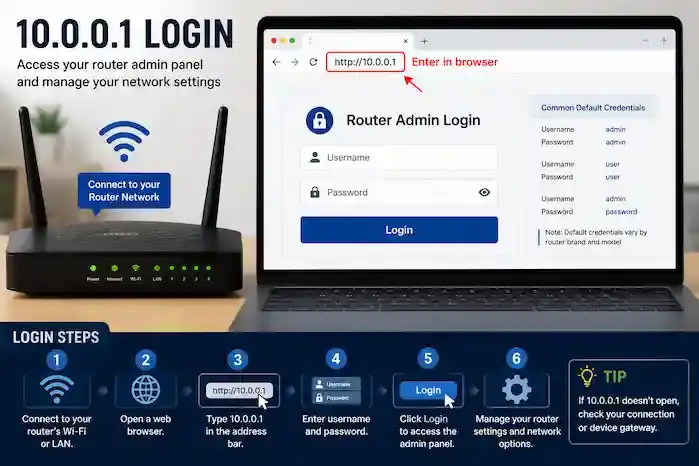
The address 10.0.0.1 is commonly used as a local network address in router and Piso WiFi setups, but not every Piso WiFi system uses the same configuration.
If your system uses 10.0.0.1 for local access, entering the correct address while connected to the network may open a login, portal, or management page. The customer pause function, however, may be controlled by a separate portal interface.
Do not confuse the customer portal with the administrator panel. Admin access is intended for managing the network and system settings, while the user portal handles customer sessions.
Frequently Asked Questions
Can I pause my Piso WiFi session?
If your Piso WiFi machine supports a pause feature, you can pause the session through its user portal. Availability depends on the system configuration.
Does Piso WiFi pause save my remaining time?
A properly supported pause feature is designed to preserve the unused session time. The exact behavior depends on the Piso WiFi system.
Why can’t I see the pause button?
Your machine may not support pausing, or the option may only appear when you have an active session. Reconnect and open the portal again.
Can I resume my Piso WiFi time later?
Yes, when the system supports session pausing, you can normally reconnect and use the portal’s resume option to continue the remaining time.
Does turning off WiFi pause Piso WiFi time?
Not necessarily. Disconnecting from the network is different from using the official pause function. Your timer may continue unless the system actually pauses the session.
Conclusion
10.0.0.1 Piso WiFi Pause Time is useful for users who want to temporarily stop an active session and use their remaining time later. When available, the pause and resume controls are normally provided through the Piso WiFi user portal.
If pause is not working, reconnect to the network, reopen the portal, check your session status, and confirm whether your specific Piso WiFi machine supports the feature.
Agar chaho to next isi page ke liye 132-character meta description bhi bana deta hoon jo “Piso WiFi Pause Time” se start ho.